Author: Fredrik Gustavsson

  • Your old content may be your most valuable content

    Old content

    Products and content often has a date where the products are discontinued and content has been old and/or replaced. Your visitors that navigates on the site will not find those pages, but visitors that comes from external sites will still land on those pages. What could you do to not just have them bouncing from your site?

    If you are working with your content in a good way where people like your content, you will have links pointing to your content. If some of those links come from relevant sites with a good reputation, those links will be important to you since they may help you climb the slippery SEO ladder on important keywords.

    Old content may be a really good source for new visitors that did not visit you before.

    E-commerce and products

    For products in an e-commerce site, this is often solved by making the products still available to find by url, but visible in any content navigation trees or internal site search. This is good, since then the value of the product when it comes to value for your site may still not be affected in a negative way. When this product is discontinued, you have a couple of choices:

    • Deleting the product from the site, hiding it for the outside world with a simple 404 page not found.
    • Making the product inactive allowing it to be found by the URL leaving it just as it was before it was discontinued.
    • Still having the inactive product available by the URL, updating the content about the product being replaced by another product or if none is available, some pieces of inspiration for how to find similar products related to the interests of those that previously bought that product.

    In an e-commerce system, there is not always a way of pointing out a new product that has replaced the old one, but here you can be creative. Use the cross-sell, up-sale or even accessories references to point the potential customer to a page where he or she can purchase something similar so that this is not just a dead end for them.

    Content with references to products

    Good content may have a lot of external links pointing to it. Content tend to be shared and linked to easier from other sites since it’s not just about one single product, it may be a text that explains how to solve a problem or a text about product reviews. What is common for this kind of content is that is often related to products that is no longer available for purchase by the visitors. Having information about products that the customer potentially could buy that are no longer buyable is an approach that is not optimal. Of course – the visitor could try to navigate or search your site to find related products or content, but there is a big risk of loosing them where they exit you site here and now.

    My approach to this problem is to make sure there is always relevant references to similar products based on the characteristics of those references in the original post.

    This is not always something that is easy to maintain, since it may be hard to know which products that the purchasing department are dicscontinued and where the procurement team has decided that they will no longer purchase this product.

    What I have started doing is to check to have the visitor stay for a little longer and hopefully becoming a customer is:

    • Avoid relating to products by their product ID.
    • Make references by searches and query conditions allowing other products to be displayed there as the old products disappear from the site.

    Every content page is supposed to be a page where you can start or continue your shopping and by presenting relevant products that could replace or fit by sharing common characteristics of the original product, you will notice that the bounce rate for those pages will go down – a lot!

    My piece of advice

    Know the value of you content. Old content that has been around for a couple of years may be a really good source for traffic that are looking for something that is no longer available, but when they are aware of this, they may end up purchasing your suggestion for replacement products.

    If you reference products from content, make sure to match by category, attribute etc to always have an updated list of related products that are buyable.

  • My multi channel commerce site is now live

    pålyset frontpage

    After months of work, my own multi channel store is now live on the best pieces of software available for running an e-commerce store. If you have ever been involved in upgrading an existing e-commerce solution from one software into another then you know that once the new site is launched, then this is actually the starting point for the real work to benefit from the new software. 

    First of all, a brief presentation of the software components used in running my e-commerce store. The software components are selected for growth and for how to be able to make the most of the store based on some of the basic requirements:

    • SEO is and will be the cheapest possible traffic. The platform must fully support us to be really good at doing SEO.
    • Content has been and will be one of the things that will attract the most visitors. We have not been able to convert those before, and by using a CXM as a front end, we will be able to do a lot in this area.
    • Additional sales channels have been successful where our products are sold on marketplaces or affiliate sites. The solution must fully support the segmentation of feeds for the different additional sales channels and optimize the feeds per sales channel.
    • Product Information Managment is the way to work with product information in a multi channel business. This business has an e-commerce store, physical store and B2B customers with a logistics organization to deliver products to local customers.
    • The solution must support both the responsible approach for mobile devices as well as the adaptive way to make parts of the pages specific for the smaller devices.

    The ERP system

    We selected a totally web based ERP-system with an integrated POS-system. This system is also integrated with the PSPs and the logistics systems for TA so that all order management of what has been sold can be managed in one system. This system is also responsible for the process of what to purchase from the suppliers with a partially automated solution with a combination of local stock and suppliers stock.

    The E-commerce engine and PIM system

    Product Information Management is something that I’ve been working with for more than 15 years now and I know how important it is to have great support for how to take the product information to the next level. Having a multi channel business, the PIM system is the information hub for product information and the products sold are created in the PIM before the ERP system. Working with updating products in bulk and enriching from external content providers has been a very important requirement.

    We were very happy to find out that there was one system that was both a really good e-commerce engine with a built in PIM system, the STORM solution used by some of the most successful e-commerce companies in Sweden.

    It provides us with a flexible e-commerce backend solution as a true SAAS solution with integrated CDN for assets and a high performance API for customer specific prices, stock status etc. The solution has been proven to be really compatible with the Sitecore Commerce Connect API, which is what I’ve been implementing on top of the STORM e-commerce engine.

    The Customer Experience platform Sitecore

    Since I first discovered Sitecore for more than 10 years ago, I have always found it to be a great dynamic platform with unique features for how to bring any data model to the web. Since the release of the Commerce Connect API, it has been my preferred solution for building e-commerce solutions. Sitecore comes with an e-commerce engine of it’s own, the Sitecore Commerce Server, but for my case, I was more interested in seeing how a totally different e-commerce engine that is already integrated to the ERP-system could be used in my case, so I selected to go for the generic API instead.

    Sitecore brings a lot to the e-commerce stores of the future. SEO will be even more important, and regardless of any personalization support, you still need to have lots and lots of great landing pages that converts the visitors into customers.

    What we get with Sitecore is the unique platform to integrate the e-commerce solution of our choice in a standardized way where we can re-use a lot of our front end logic in other future projects even if that customer wish to have another e-commerce solution.

    Product recommendations

    We have selected Nosto as our partner for providing product recommendations. We have selected to go only for Nosto on the product level, based on the way that our category structure works, and I will dive more into the details of this solution in future posts.

    What we did here was to create a module on top of the Commerce Connect API to allow Nosto to provide us with product recommendations to extend the personalization features of Sitecore and the logic in STORM.

    Customer support and chat

    We have already been using Zendesk for our customer support since the previous e-commerce solution. We created an integration to Zendesk API from Sitecore.

    Additional Sales Channels

    The additional sales channels consume product information through feeds provided by our implementation on top of Sitecore Commerce Connect with a set of different technical solutions for feeds including CSV, JSON and XML.

  • Disconnected category structure

    Disconnected category structure

    The optimal solution for an end user would be a totally dynamic category structure that has no links to rigid and fixed structures at all. This will however create a mess when it comes to search engines with continuously changing category structures where the content is always changing. Not good for SEO.

    44281809_s

    In a traditional e-commerce site, there is often only possible to navigate to a structure in one way or maybe two different ways. I mentioned about this problem in my previous posts about the non flexible e-commerce stores.

    Categories and attributes

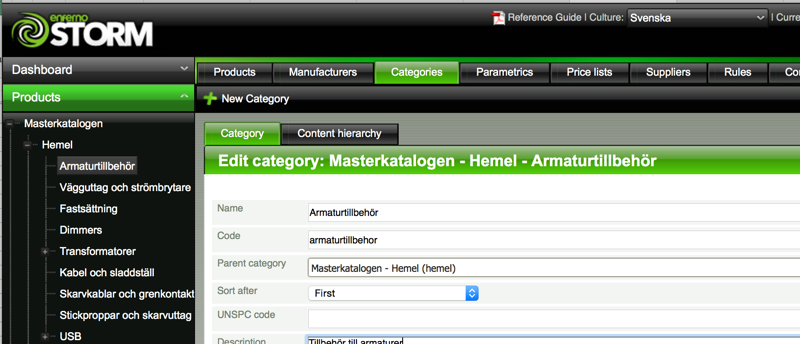
    In my case, when using STORM as the source of my product information, I have categories created with a focus on how to structure products in categories where the categories also are used to control which attributes that are valid under each category.

    storm-category-tree

    In this implementation, we have chosen to create a shallow category tree compared to what we used to have before in the previous solution. This structure will be available on the web site as a basic navigation structure where it is possible to navigate to each of those nodes.

    Site navigation structure

    category-structure-sitecore

    The navigation structure in Sitecore is much deeper than the structure in STORM in order to assist the user in finding the correct product in category navigation. Each of the categories in Sitecore are then connected to a search criteria to find out which of the products to show in each category. The connection is made by the following search parameters:

    • One or several categories in the master structure
    • Filter on manufacturer
    • Filter on attributes
    • Filter on stock status

    This makes it easy to drill down into the category structure without maintaining the details of each level by managing which products that belongs to each node.

    commerce-connect-categories

    In the screen shot above, you can see that we have connected the category source to a part in the commerce connect data model for classifications. We selected to set the name of each node with the entire hierarchical structure in order to know which leaf that has been selected. In our case, we have the leaf node of E14 in more than 8 places and we prefer to know which E14 we are dealing with.

    Using STORM data within Commerce Connect data model

    The other benefit of connecting Sitecore Commerce connect classifications with STORM categories is that we manage which attributes that are available on the classification level. This means that we can make an intelligent selection of which attributes that are really possible to drill down into in the end user interface in the e-commerce site. In STORM, we also select which of the attributes that will be possible to drill down on a category so that the user interface is kept nice and tidy for the end user.

    When it comes to the actual content of the categories when it comes to populating them, we are using the STORM API to make real time requests to get a sorted list of which products to display on each category level based on the configured source categories and search parameters. The products are then fetched by using standard Sitecore item retrieval which makes us benefit from all cache functions in Sitecore.

    Examples of such a query:

    • Category: Master Catalog / Lighting / LED / E14
    • Attribute: Bulb Shape = Classic P
    • Attribute: Dimmable = False

    Then Storm will return a list of SKUs matching the query. In Sitecore Commerce Connect, the products all have an external product ID.

    commerce-connect-externalid

    This external ID can be calculated to find out the Sitecore ID of that item. There is an IdGenerator class that is accessible through the ProductRepository provided as part of Commerce Connect to really quickly retrieve items based on primary keys for display in the category tree. The request to STORM is of course also managed in a cache to not run a request over the network for each category browsing request.

    What about SEO?

    From a SEO perspective, we will make sure to have each product existing in one of the master categories that are quite full of data as the master source of that product. Bread crumbs will always point to this category if a product is referred to from a random URL or found in a result of a search engine. This category is then tagged with previous and next SEO style tagging of the links to show browse several pages of the category that at this point is really large. The focus on the smaller categories will be the category text section and prioritized images for each category.

    The main navigation will not contain links to every category on the site. It will be limited to the top levels only to make sure that the search engine will have relevant child links when drilled down on each category structure. You will only see one or two levels down in the tree for each level that you drill down.

    Each product will have a unique URL that is not connected to a category, so when ever there is a link to a product from a category, the link till go to the product URL and have no relation at all to the category.  This eliminates the need for dealing with canonical tags for each product and risk having a product appearing with details on several pages.

    We have to be a bit careful about which information about a product that we share on the categories compared to on the product pages, which is also why we will save the important copy text to only be available on the product pages.