Author: Fredrik Gustavsson

  • Product synchronization between backend and frontend

    Product synchronization between backend and frontend

    The data model in Sitecore Commerce Connect is based on  artifacts and product information. All data is stored within Sitecore as Sitecore Items, which means that the solution will use the same components as the rest of Sitecore for providing the standard features for search, scalability, API and the possibility to extend the model by use of inheritance. To populate this tree, there is a solution in Commerce Connect that will provide pre defined pipelines in which to run processors to deal with the different types of information required to keep the data up to date.
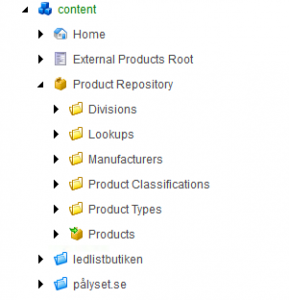
    commerce-connect-data-model

    The tree consists of the data that are used to populate the product information and the product information itself. The folders under Product repository that are yellow are what are called “Artifacts” and are owned by the underlying backend systems but synchronized into Sitecore. The products are stored in item buckets and can be searched just as any item.

    Product Synchronization

    To be able to benefit from all the features in Sitecore, the product data is synchronized into the data model. This is done by using the concept of pipelines, where there are a couple of steps.
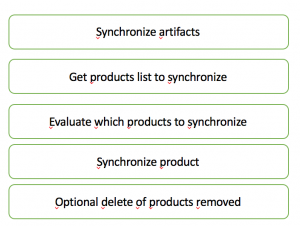
    synchronize-all-products

    Each step consists of a pipeline itself, but this gives an overview of how the product synchronization works.

    Synchronize artifacts

    The artifacts are the fundamentals in the logical data model. This includes the different manufacturers/brands, divisions, classifications, attributes, product types. They are by default fetched from the external systems before products are synchronized to ensure that all data to refer to from the products are already present.
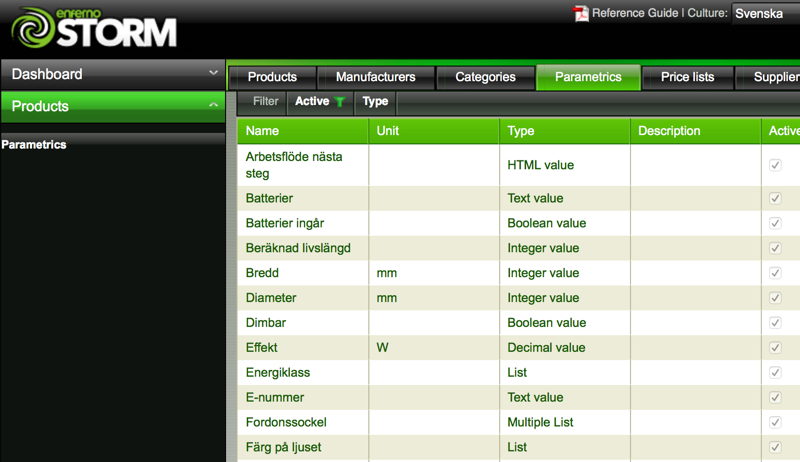
    parametrics-storm

    In the screen shot above, we can see the parametrics in STORM that are going to be exposed as attributes in Sitecore.  In STORM, the product attributes are named parametrics. Those attributes can be either plain input fields or selections from lists for single or multiple values.

    specifications-sitecore

    When synchronized into Sitecore it is imported as specification lookups. This is then used to integrate with the product data model in Commerce Connect. A specification value can be either a plain input value or connected to a lookup list of fixed values to provide filtering in the frontend.

    Get products list to synchronize

    This part of this pipeline is used to decide which products to synchronize. We have connected this list to the ESB and a list of updated products that need to be populated in the frontend system. This is a list of external Ids of products that are to be synchronized. The really neat part here is that if data is fetched from several different system, this list can be concatinated as a total list of all products that need to be synchronized from several source systems such as a PIM system and an ERP system.

    It is also possible to set a list of products to delete later on in the pipeline.

    This list does not have to be a list of all available products, just the list of the products that need to be synchronized. In our solution, the e-commerce backend system will provide us with a list of the product ids that need to be refreshed in the frontend.

    Evaluate which products to synchronize

    This stage is to eliminate possible data that is not going to be read from the source system and stored back into the target system. This stage may contain calculations such as if the modification date is changed or based on a checksum. If a product is not to be synchronized, it is removed from the list created by the previous step.

    Synchronize product

    For each product identified in the steps below for being synchronized, this step is used to read the actual product from the source system. This pipeline is invoked once per product from the list that comes out of the steps before.

    Several systems may be the source for the same product such as in the case where the ERP holds part of the information and the PIM systems provides additional information and assets.

    This pipeline will also update the indexes with product information.

    Delete products

    The last step is to use the list provided by the previous processors in the pipeline for product synchronization to delete old products that are no longer to be available. This is normally only used for products that has not yet reach the status of sellable since it is not recommended from a SEO perspective to remove old products from the store. It is often better to preserve the SEO value and instead provide a replacement either by automation or by showing that on the product.

    Flexibility in the pipelines

    As all parts of Sitecore, the provided pipelines are just an example of how things are done. It is a good thing to try to stick to the intended way and just add and replace parts of the processors in the pipelines in order to keep the solution as standardized and upgradable as possible. We will look into the details in the different parts in the upcoming posts.

  • Frontend e-commerce solution based on Sitecore

    One of the best solutions out there for managing content is, and has been for a while, Sitecore. When we decided on which systems to select for the upgrade of our software infrastructure, we started looking at which CMS to base the solution on, since content is really what brings us visitors to our store. According to Gartner, Sitecore is now in one of the best possible positions according to Gartner as published on Sitecores website about Gartners magic quadrant for WCM 2015.

    In a modern e-commerce solution where content is helping us reach good positions in the search engines for relevant keywords, it is really important that we are able to build the new website to elaborate on how the current e-commerce store is performing. We can see that the pages that have the highest conversion rate are those that are driven by content such as product comparisons, knowledge sharing and ways to solve problems by our products.

    We have been looking at other e-commerce solutions, and most of them have some capabilities when it comes to content, but it is really basic. The pages that are really good landing pages combine content and product information in one place. This seems to be a bit of diffecult problem to solve with the different solutions. Either you will have a really good CMS or you will have a really good e-commerce solution for selling products. Most solutions are not yet enabled to have the perfect mix between content and products.

    Sitecore Commerce Connect

    In Sitecore, there is a standardized way of implementing e-commerce in the experience platform from a frontend and backend perspective. There is an object model that can store product data and ways to integrate with it just enough to suit your business needs. There is an object model and ways to manage shopping carts, customers, orders, prices, inventory, discount codes and all the components that are required to create an online store.

    It is possible to implement an e-commerce solution based on Sitecore without using Commerce Connect, but then every e-commerce solution would become unique. There are probably several solutions out there doing just this that are working just fine too.

    What I see as the main benefits from my point of view of using Commerce Connect is:

    • The data model is standardized. In every implementation using Commerce Connect, a product is a product.
    • There are pipelines that are invoked to integrate with backend systems for all the commonly used use cases in an e-commerce site.
    • It is possible to use plugins from the Sitecore Marketplace regardless of which backend system that I am using.
    • It is by design possible to integrate several backend systems in the different pipelines, such as having a PIM system providing product information, the ERP system providing prices and stock etc.
    • One commerce solution with a product repository shared along the different sales channels such as our smaller more specialized e-commerce stores and market specific stores.

    In the following posts, you will learn how we have used the combination of Sitecore and Commerce Connect to integrate with the underlying PIM and ERP systems, payment service providers, CRM system etc.

    The backend for e-commerce

    For those of use that have been working with a lot of different e-commerce solutions, we have learned that there is seldom a solution that is great for everyting. It is often the case that the best total solution is created from a combination of several underlying systems interoperating together as the solution. Due to the requirements with a content driven business, we were not able to use the pure e-commerce solutions such as Magento and needed something that could help us with several of our requirements on a backend system.

    We have selected STORM as the e-commerce backend. This is for several reasons, but perhaps mostly because:

    • There are APIs in Storm to provide Commerce Connect with all the data is requires for building a commerce solution based on the idea behind Commerce Connect.
    • It provides us with a way of populating our products with technical data from the content providers such as CNet and Icecat, since we are selling mostly well known standard products. We want to spend time having great product information, not chasing already known technical attributes.
    • It allows us to have a flexible strategy for stock by implementing and selling a much wider assortment by using our suppliers stock and drop shipment from the suppliers that provides this for us.
    • Rules for setting prices based on purchase prices and competitor prices which means that we may have attractive prices in some categories, but not too attractive compared to our competitors.
    • A true SAAS solution that is constantly being improved.


  • Recommendations for related products may be misleading

    Recommendations two ways

    Did you ever think about that when you visit a product in a store, that product may very well be related to other articles in the store. It is often the case that one product may be also be related to others depending on the context where it is used. If you provide the wrong recommendations, you may risk loosing a visitor instead of gaining a customer.

    In my store, we sell LED-lighting products and often have products that are both applicable for kitchen and bathroom. This means that for those of our visitors that come visit us when browsing for LED-lighting for a bathroom are highly interested in getting primarily bathroom related recommendations on what is similar to what they are looking for.

    Many solutions today, including the one we are currently using with recommendations won’t be able to tell the difference and will proudly present relations to the visitor based on the products that they visit and whenever they take a step into a product page that relates both to kitchen and bathrooms, we may lead the visitor on the wrong track.

    This is not just something that happens in theory, we can see that from our customer service tickets, that it’s common to have questions based on the automatic recommendations where there a mix of products between several areas that they would like to use in their future redecoration project.

    So there is still facetted navigation when the customer can set a filter on what to look for. This filter often applies for what is ON the product and not what is RELATED to the product. This means that the recommendations will become even more misleading.

    The solution we are looking into is personalization and how to start using also this information that we know about the customer to make sure that the information that we present to them are more relevant based on the navigation history. We need to hit the spot right away, since we don’t have that many clicks to figure out what kind of person they are. In order to do this, we are in the middle of tagging our products in the backend PIM system for a set of areas of interest and connecting the same tags to the information pages so that we will get a quicker way of figuring out what our visitor is looking for. It must also be possible to re-evaluate the visitor really quickly if we are on the wrong track.